
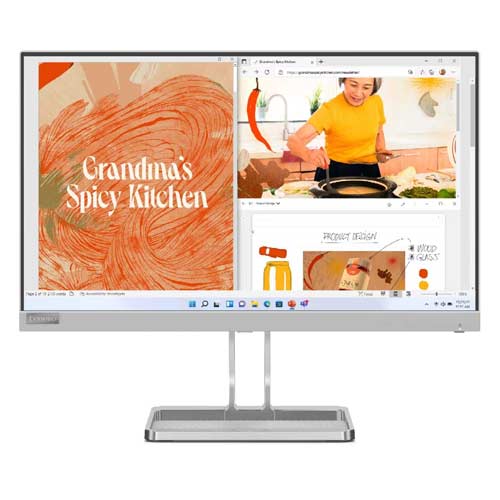
Lenovo L22i-40 21.5" IPS FHD 75Hz Speakers Monitor
Cash Price: ৳13,950.00 Regular Price:৳14,950.00Availability: In Stock SKU: 9.60.6.4946
Quick Overview
-
Support
Saturday – Thursday: 09 AM - 06 PM. -
Payment
Cash on Delivery | Card | Online Payment -
Shipping Cost
Inside Dhaka 150tk | Outside Dhaka 250tk -
Warranty Policy
Read More
Description
Lenovo L22i-40 Monitor – Smart, Stylish, and Practical for Everyday Use in Bangladesh
The Lenovo L22i-40 comes with a 21.5-inch display, a size that hits the sweet spot. It’s large enough to comfortably handle documents, spreadsheets, online meetings, and entertainment, yet compact enough to sit neatly on smaller desks commonly found in Bangladeshi homes and offices. You get more screen real estate without sacrificing workspace.
Full HD Clarity That Makes Work Easier
With a Full HD resolution of 1920 × 1080, everything looks crisp and well-defined. Text is sharp, images appear detailed, and presentations look professional. Whether you’re working on Word documents, reviewing PDFs, attending Zoom meetings, or managing Excel sheets, the clarity reduces eye fatigue and helps you stay productive for longer hours.
Accurate Colors for Creative and Professional Tasks
The monitor covers 99% of the sRGB color gamut, which is impressive in this class. What this really means is that colors look natural and consistent. Designers, content creators, and marketers can confidently handle basic color-sensitive tasks like social media creatives, website visuals, or product images without worrying about color mismatch.
NearEdgeless Design for Better Multitasking
Lenovo’s 3-side NearEdgeless display minimizes bezels on three sides, giving you a more immersive viewing experience. It’s especially useful when working with large Excel spreadsheets, comparing documents side by side, or setting up a dual-monitor workstation. Less bezel, more usable screen.
IPS Panel for Wide Viewing Angles
Thanks to the In-Plane Switching (IPS) panel, colors stay accurate and images remain clear even when viewed from the side. This makes it ideal for collaborative work, family movie nights, or simply leaning back in your chair without losing picture quality.
Smooth Performance for Gaming and Videos
The 75Hz refresh rate offers smoother motion compared to standard 60Hz monitors. Casual gaming, scrolling, and video playback feel noticeably more fluid. Support for AMD FreeSync helps eliminate screen tearing and stuttering, giving you a more enjoyable gaming experience, especially with entry-level or mid-range graphics cards.
Built-in Speakers for a Cleaner Setup
The Lenovo L22i-40 includes two built-in 3W stereo speakers, delivering clear and loud audio for meetings, online classes, music, and movies. This reduces the need for external speakers, keeping your desk neat and clutter-free.
Eye Comfort for Long Working Hours
Eye strain is a real concern, especially for students and professionals in Bangladesh who spend long hours in front of screens. This monitor features Natural Low Blue Light technology, certified by EyeSafe 2.0 and TÜV Low Blue Light. Harmful blue light is reduced without distorting colors, making it easier on your eyes during extended use.
Easy Connectivity with Old and New PCs
You can connect almost any computer using the 1 × HDMI 1.4 and 1 × VGA ports. This makes the monitor compatible with modern laptops as well as older desktop systems still widely used in offices and institutions across Bangladesh.
Sleek Design That Elevates Your Desk
Design matters, and Lenovo gets it right here. The 6.9 mm ultra-slim head, cloud grey color, and metal frame stand give the monitor a premium, contemporary look. It blends perfectly into modern offices, study rooms, and professional setups.
Smart Ergonomic Touches
Built-in cable management helps keep your desk organized. The integrated phone stand keeps your smartphone in view for calls, notifications, or quick references, a small but thoughtful feature that makes daily work more convenient.
Easy Control with Lenovo Artery Software
Adjusting display settings is simple using Lenovo Artery Software, allowing you to fine-tune brightness, color, and other parameters without fumbling through physical buttons.
Why the Lenovo L22i-40 Is a Great Choice in Bangladesh
This monitor is ideal for:
-
Office professionals and remote workers
-
Students and online learners
-
Small business owners
-
Casual gamers and entertainment lovers
It balances performance, comfort, design, and price in a way that makes sense for the Bangladeshi market.
Top Features at a Glance
-
21.5-inch Full HD IPS display
-
3-side NearEdgeless design
-
99% sRGB color coverage
-
75Hz refresh rate with AMD FreeSync
-
Dual 3W built-in speakers
-
TÜV & EyeSafe certified Low Blue Light
-
HDMI and VGA connectivity
-
Ultra-slim cloud grey design with metal stand
Whether it’s work, study, gaming, or entertainment, the Lenovo L22i-40 Monitor delivers a refined viewing experience with practical features and modern style that fit perfectly into everyday life in Bangladesh.
What is the price of Lenovo L22i-40 21.5" IPS FHD 75Hz Speakers Monitor in Bangladesh?
Write a review
Question Answer
Have question about this product? Get specific details about this product from expert.


Lenovo D27-30 27-inch FHD FreeSync Monitor

Lenovo L22i-30 21.5" FHD FreeSync Monitor

Lenovo L22e-30 21.5-inch FHD Monitor